





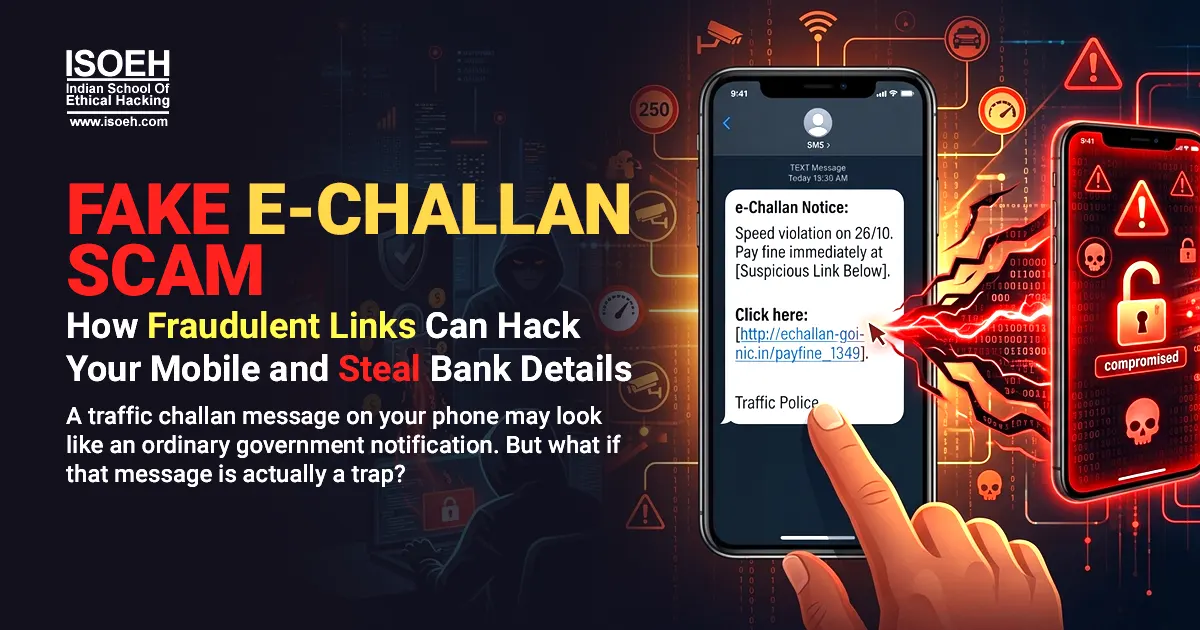
A recent e-challan cyber fraud case in Jaipur has once again highlighted how cybercriminals are using fake traffic violation messages, fraudulent links and malicious APK files to target smartphone users. The scam is designed to look legitimate, making it difficult for users to immediately identify the threat.
The Rajasthan Police has also warned people about fake RTO and e-challan messages being used to distribute malicious applications and steal sensitive information.
How the Fake E-Challan Scam Works
The attack usually begins with an SMS, WhatsApp message or similar communication claiming that a traffic violation has been recorded against the recipient. The message may include details such as:
- A pending traffic challan
- A vehicle registration number
- A fine amount
- A deadline for payment
- A warning about further penalties
The message then provides a link asking the recipient to check or pay the e-challan.
The link may lead to a fake website designed to resemble an official government or transport department website. In other cases, users may be asked to download an APK file with names resembling legitimate applications, such as “RTO Challan.apk”, “eChallan.apk” or “mParivahan.apk”. Rajasthan Police has specifically warned about such malicious APK-based scams.
What Happens After the Malicious APK Is Installed?
This is where the scam can become much more dangerous. An APK downloaded from an unknown source can contain malware. Once installed, the malicious application may request access to sensitive areas of the smartphone. Depending on the malware and permissions involved, attackers may attempt to:
- Read SMS messages
- Access OTPs
- Collect personal information
- Steal banking credentials
- Abuse device permissions
- Monitor notifications
- Access sensitive data
- Facilitate unauthorised financial transactions
This means a fake traffic challan is not simply a payment scam. It can become a mobile hacking and banking fraud incident. Reports on the Rajasthan scam have warned that malicious e-challan APKs can be used to compromise banking information, OTPs and other personal data.
Why Do Fake E-Challan Messages Look So Convincing?
The success of this type of phishing attack depends heavily on social engineering. Cybercriminals exploit something people already recognise: government traffic notices. A message mentioning a vehicle number or an unpaid traffic fine can immediately create concern. The victim may click the link simply because they want to check whether the challan is genuine.
Attackers often add urgency to the message by suggesting that the driving licence could be suspended, additional penalties could apply, or immediate payment is required. This combination of authority, urgency and fear can cause users to act before verifying the message.
Fake Website or Fake App? Both Can Be Dangerous
There are generally two common approaches used in e-challan fraud.
1. Fake E-Challan Website
The victim clicks a fraudulent link and is redirected to a website that looks similar to an official government portal. The website may ask for vehicle details, mobile numbers, card information, UPI details or other sensitive information.
2. Malicious APK Application
The victim is instructed to download an application to view or pay the challan. Instead of a legitimate traffic application, the APK may contain malware. Installing it can give the malicious software access to sensitive device functions, depending on the permissions granted.
This is why cybersecurity experts repeatedly advise users not to install APK files received through unsolicited SMS or WhatsApp messages.
How to Identify a Fake E-Challan Message
Users should be particularly cautious when a message:
- Comes from an unknown or suspicious number
- Contains a shortened or unfamiliar URL
- Asks you to download an APK
- Creates pressure to make an immediate payment
- Requests unnecessary app permissions
- Asks for OTPs, UPI PINs or banking passwords
- Uses spelling or grammatical errors
- Claims to be from a government department but uses an unofficial domain
A legitimate-looking logo or government-style design does not prove that a website or application is genuine.
How to Check an E-Challan Safely
Do not use the payment link received in an unsolicited message. Instead, manually open the official eChallan portal and check your vehicle or challan details there.
The official portal has itself issued warnings about fraudulent websites and mobile applications impersonating eChallan services. Official eChallan Portal
The safest approach is simple: Don't click first. Verify first.
What Should You Do If You Already Clicked the Link?
If you have clicked a suspicious e-challan link but did not download anything or enter personal information, close the website and avoid interacting with it further. If you downloaded or installed a suspicious APK, take immediate precautions:
- Disconnect the device from the internet if you suspect active malicious activity.
- Uninstall the suspicious application if possible.
- Review the permissions granted to recently installed applications.
- Change important passwords from a trusted device.
- Contact your bank immediately if banking information may have been exposed.
- Monitor your bank and UPI accounts for unusual transactions.
- Report suspected financial cyber fraud immediately.
In India, victims of financial cyber fraud can report incidents through the 1930 cybercrime helpline and the official National Cyber Crime Reporting Portal.
The Bigger Cybersecurity Risk
The fake e-challan scam is part of a much larger trend in online fraud and cybercrime. Cybercriminals are increasingly impersonating trusted organisations and using everyday digital services as bait. Similar techniques can involve fake bank alerts, courier notifications, electricity bills, KYC updates, job offers and government notices.
The technology behind these attacks may be sophisticated, but the first step is often surprisingly simple: Get the victim to trust the message.
Once that trust is established, a single click can expose personal information, device access or financial credentials.
Stay Alert Before You Click
A traffic challan should never be treated as an emergency simply because a message says so. Before opening a link, downloading an application or making a payment, stop and verify the source.
A fake e-challan may look like a traffic fine. The real threat could be malware, mobile hacking or financial fraud waiting behind the link. In cybersecurity, a few seconds of verification can prevent hours—or even months—of dealing with the consequences of an online scam.

Read Other Articles
Read All Articles »
Quick look at the 10 facts you need to know about the latest Facebook hack
Read Details »
Top certifications in cyber security industry
Read Details »
Building a career in IoT: A thorough guide
Read Details »
The mystery of UIDAI : Who & Why!! Is it a threat? A detailed discussion
Read Details »
Top 5 cyber security jobs in the age of Cyber Disruption
Read Details »
Top Cyber Security trends of 2018
Read Details »
A severe vulnerability in Signal desktop app allowing hackers to steal chats in plaintext without any user interaction
Read Details »
Cambridge Analytica and Facebook Controversy: What happened so far?
Read Details »
Equifax identifies an additional 2.4 million U.S. consumers affected by the massive data breach of 2017
Read Details »
Severe flaw in µTorrent can let hackers to control your PC remotely
Read Details »
Cyber Criminals are turning into Cryptominers, Dominating Cyber Threat Landscape
Read Details »
Android Banking Trojan targets over 232 banking apps, including Indian banks
Read Details »
Private end-to-end encrypted Whatsapp group chats are not secured anymore!
Read Details »
Top Cyber Attacks In 2017
Read Details »Hacking Tools
Explore All Hacking Tools »
UFTP is an encrypted multicast file transfer program for secure, reliable & efficient transfer of files. It also helps in data distribution over a satellite link.
Read DetailsBreaking News
Breaking News Of Each Month »
The recent pandemic was unexpected and unknown to most part of the world. It has changed our life and we are slowly adapting to our new lifestyle. The risks associated with the new lifestyle, both personal & corporate, are unknown to most of us.
Read Details